AI receptionists
AI receptionist: what it does, what it costs and how to choose one
An AI receptionist is software that answers your business calls, talks with callers, and passes on or acts on what they need. It can cover after hours and busy moments. Choose one by testing it with real calls: check how it handles your questions, hands off to a person, and what it costs at your call volume.
- Written by
- Kishore, Wizard
- Published
What is an AI receptionist?
An AI receptionist is software that answers the phone for your business. It greets the caller, understands what they want, and then helps: it can answer common questions, take a message, book a time, or pass the call to a person.
It does the front-desk work of a receptionist, but it doesn't get tired and can pick up when your team can't. It is not a person, and it will not know things you haven't told it.
You may also see it called an AI answering service or an AI phone answering service. The idea is the same: software picks up, so no caller hears endless ringing or a full voicemail box. For a small business, it's a way to answer every call without hiring another person.
What does an AI receptionist actually do?
- Answers every call, including after hours and when all your lines are busy.
- Answers the questions you hear all day: opening times, prices you have approved, directions, how to book.
- Takes a message and sends it to the right person.
- Books or changes appointments, if it is connected to your calendar.
- Passes the call to a person when the caller asks for one, or when it can't help.
How is it different from an answering service or a human receptionist?
| AI receptionist | Answering service | Human receptionist | |
|---|---|---|---|
| Who answers | Software | A call-center agent | A member of your team |
| Hours | Any hour you set | Usually any hour | Working hours and shifts |
| Handles several calls at once | Yes | Depends on the service | No |
| Knows your business | Only what you set up | What you give the agents | Learns on the job |
| Judgment in unusual cases | Limited, so set up handoff | Follows a script | Strongest |
| Cost | Ask for a quote at your volume | Ask for a quote at your volume | Wages and benefits |
The right choice depends on your calls. Many businesses use software for routine calls and keep a person for sensitive ones.
If you're weighing up an answering service for a small business, the biggest differences are who picks up, what they can do on the call, and how you're billed. Our guide to virtual receptionist costs puts published prices side by side.
How much does a human receptionist cost?
As a benchmark, the US Bureau of Labor Statistics lists the median pay for receptionists at $38,010 a year. That is wages only, before benefits, training, cover for time off and any extra hours. Check the Bureau of Labor Statistics page for the current figure.
How do I choose an AI receptionist?
A short way to choose
- List your top ten call typesWrite down what callers ask for, and which calls must go straight to a person.
- Call it yourselfPhone the demo line at different times. Ask your real questions, interrupt it, and speak the way your customers do.
- Test the handoffAsk for a person and check what the person sees when they pick up.
- Check what it can do after the callDoes it book, send a message, or update your records, or only take notes?
- Ask where recordings are keptAsk who can see transcripts, how long they are kept, and for security documents in writing.
- Get a price at your volumeAsk for a worked example using your usual number of calls and minutes.
- Start smallRun it on after-hours calls first, then widen once you trust it.
What should I tell it before it starts answering?
- What you do, where you work, and your opening hours.
- The answers you are happy for it to give, in your own words.
- What it must never answer, such as prices you haven't agreed or advice you can't give.
- When to pass the call on, and to whom.
- How to say your business name.
What should an AI receptionist say?
Callers relax when the assistant sounds like your business, says what it is, and never bluffs. Here are example lines you can adapt. Read them aloud before you use them: if they sound stiff, shorten them.
| Moment | What it can say |
|---|---|
| Greeting | “Thanks for calling [your business]. I'm the automated assistant. I can book you in, answer questions or put you through to the team. How can I help?” |
| Booking | “Thursday at 3:30 PM is free. You're booked, and I've texted you the details.” |
| After hours | “We're closed right now, but I can book you in for tomorrow or take a message for the team first thing.” |
| When it doesn't know | “I don't have that answer, and I don't want to guess. I'll pass you to someone who does.” |
| Handing over | “I'll put you through to [name] now and tell them what you need, so you won't have to repeat it.” |
| Urgent call | “That sounds urgent. I'm connecting you to the person on call now.” |
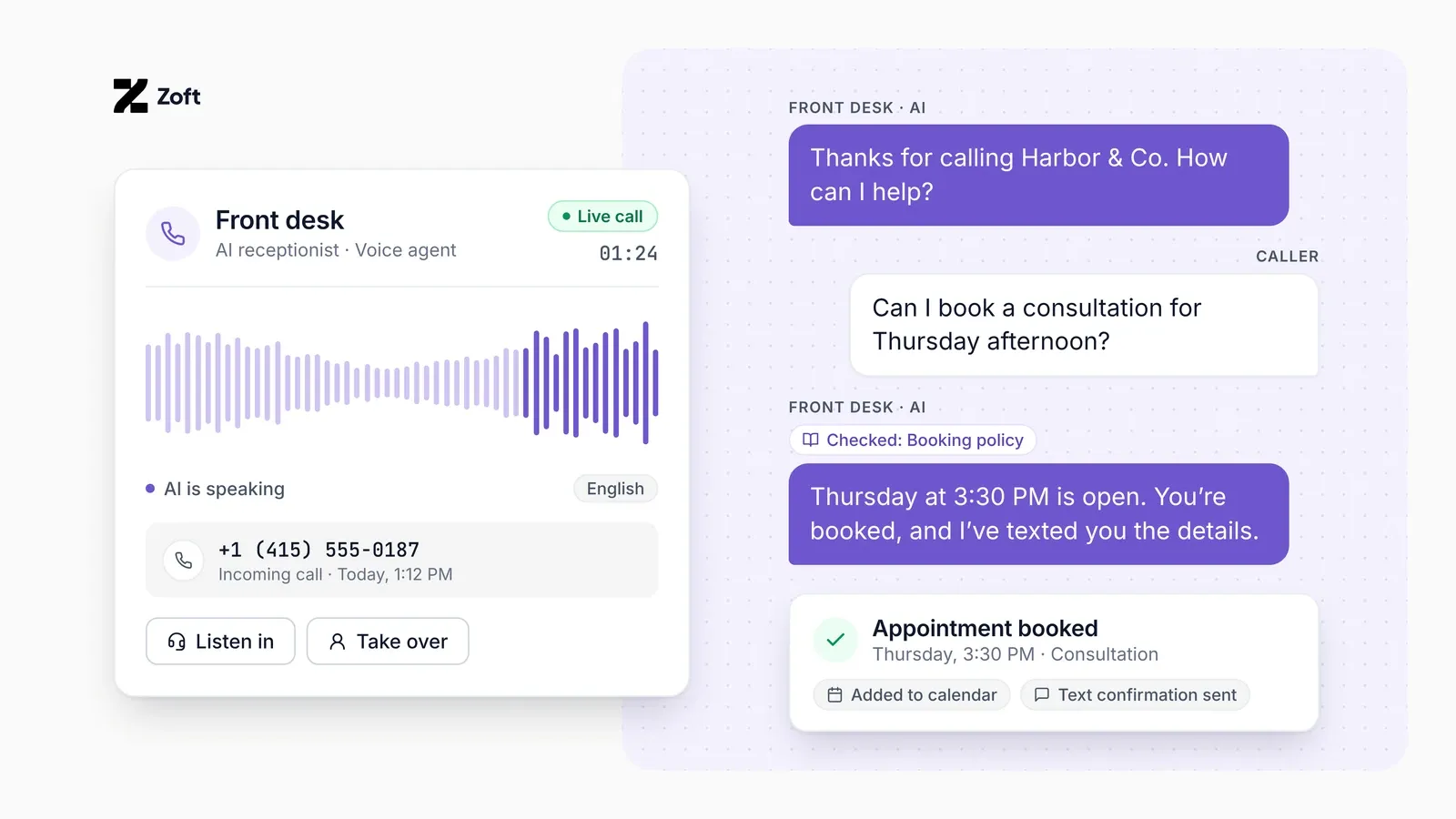
Three habits keep it sounding human: short sentences, your own words for your services, and a quick way to reach a person.
How do I set one up?
- Write down your call types and the answers for each.
- Choose how calls reach it: forward all calls, or only after hours or when you don't answer.
- Test with your team before customers call.
- Listen to the first week of calls and fix gaps.
- Review a sample of calls every week.
How do I forward calls without losing any?
You usually keep your number and forward calls to the AI. There are three common ways to do it:
- Forward all calls. The AI answers first, every time. This suits a business where nobody is free to pick up during the day.
- Forward when you don't answer. Your phone rings first. If nobody picks up after a few rings, or the line is busy, the call moves to the AI. Phone providers often call this conditional forwarding.
- Forward on a schedule. The AI answers only outside opening hours. It's a low-risk way to start.
Before you switch it on, call your own number from a mobile and a landline at different times, and check that every route reaches the AI. Make sure the caller's number comes through, so you can call back. Keep a fallback, such as voicemail or a team member's phone, in case something breaks. If you're not sure your phone plan supports conditional forwarding, ask your provider.
What happens during a call?
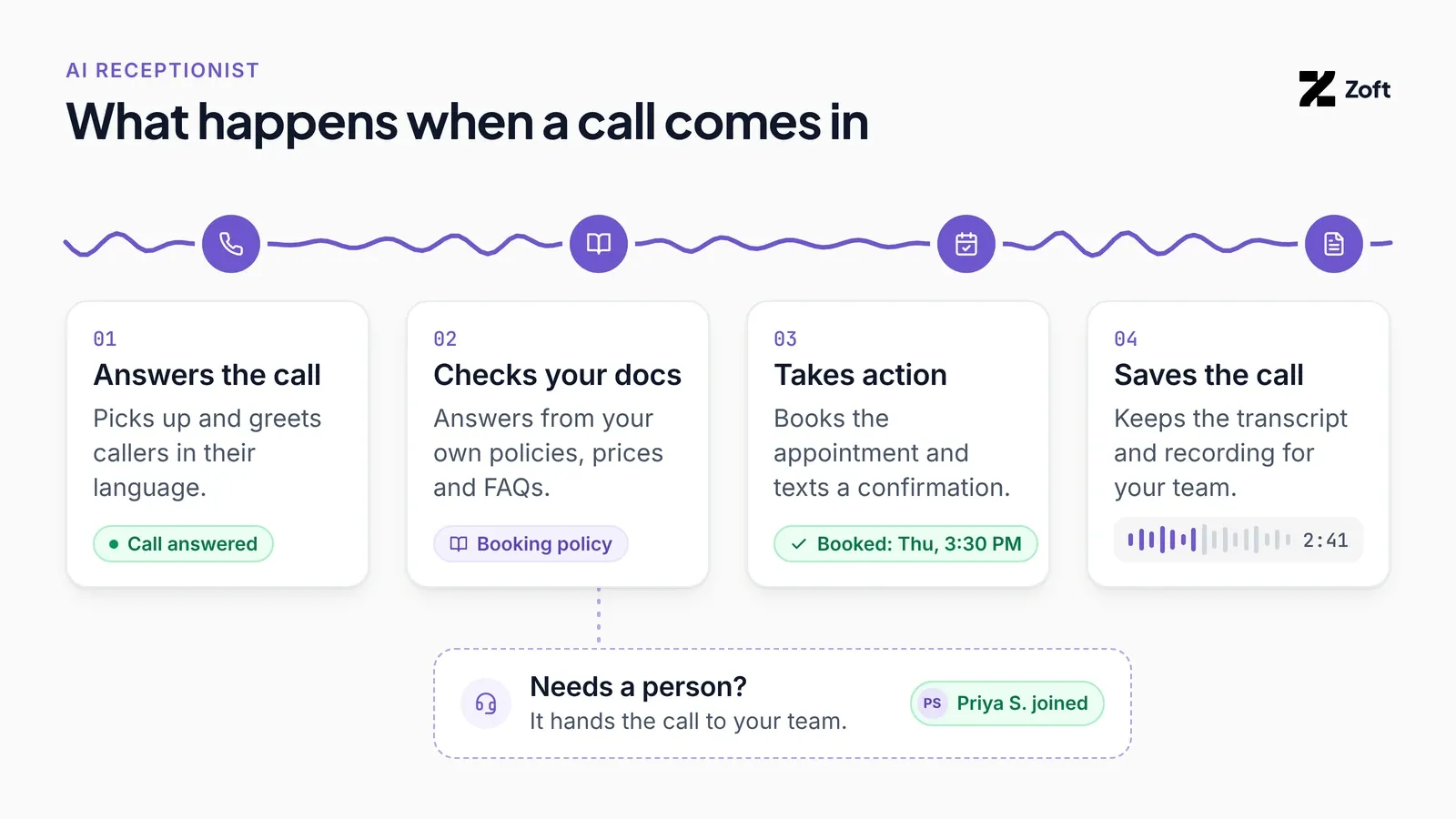
The AI greets the caller, listens, and answers from the information you gave it. If it can finish the job, it does, for example by booking a time. If the caller asks for a person, or the AI is unsure, it passes the call on. With Zoft, a person can take over the call, and afterwards the AI can resume. Calls are recorded by default, so you can review them.
Industry data, not a Zoft result: in a Gartner survey of 3,566 customers (fielded February and March 2026), 87% said it is essential for companies using generative AI in customer service to offer a way to reach a human agent. That is why handover to a person matters when you choose a receptionist.
What should an AI receptionist do after the call?
Answering is the easy part. The value is in what happens next, and it's where tools differ most. Before you choose one, check it can do these on a test call:
- Book it properly. The appointment lands in your calendar, not in a note someone has to copy across.
- Confirm it. The caller gets a text with the time and details, so they have it in writing.
- Update your records. New callers and changes go into the system you already use, if the receptionist is connected to it.
- Tell the right person. Urgent calls reach whoever is on duty straight away, and everything else lands in one place for the team.
- Follow up. Callbacks, reminders and requested information go out without anyone having to remember.
- Keep the record. The transcript and recording are saved, so you can check what was said and spot questions it couldn't answer.
With Zoft, these steps run as part of the same call, and a person can step in at any point.
What does it look like in practice?
Illustrative example, not a customer result. An HVAC company forwards its line to the AI at night.
- A homeowner calls at 9 pm. The AI asks what is wrong and where.
- It books the next free slot and texts a confirmation.
- It posts an alert in Slack for the team.
- If it sounds like an emergency, it hands the call to the on-call person.
What should I check before I choose one?
- Handover: can a person take over a live call, and can the AI pick it back up?
- Your phone number: does it work with your existing line, or does it make you switch?
- Languages: which ones do your callers use?
- Review: can you listen to calls and see what it did?
- Cost: ask for a worked example at your own call volume.
What do people ask next?
Will callers hang up on an AI?
Some callers may. Say at the start that it is an automated assistant, and make it easy to ask for a person. Before you go live, have your own team call it and listen for the places where callers have to repeat themselves.
What happens to calls it cannot handle?
Decide this before launch: who gets the call, and what the assistant says while it passes the call on. A clear handoff matters more than a polished greeting.
What do most buying guides skip?
The work after the call. A booked call still needs a calendar entry, a confirmation and a note for your team. Ask every vendor what happens once the call ends, and who does it.
When is another option the better pick?
If most of your calls are sensitive, a person or a human-staffed answering service may suit you better. If you have developers and want to build your own voice product, a developer platform such as Vapi or Retell gives you more control. An AI receptionist fits when the calls are routine and you want the follow-up handled too.
Can Zoft answer my phone?
Zoft's Voice Agent answers and makes phone calls, in up to five languages per agent, and takes action during the call. It connects to your own Twilio number, and a person can take over a call when needed.
Zoft is built to run the work behind the call too, which is a different job from only answering it. If you want one tool for the phone and the follow-up, request a discovery call and tell us which calls you handle.
Setup starts with a 30-minute discovery call. Zoft builds the assistant from your website and documents, you test it, it goes live, and a 30-day tune-up follows. Zoft connects to your own Twilio number, and it does not sell phone numbers. Pricing is custom, quoted after the discovery call.
Where Zoft fits
Frequently asked
Common questions
Can an AI receptionist replace a human receptionist?
For routine calls it can take a lot of the load. Many businesses keep a person for sensitive calls and unusual requests, so plan a clear handoff.
Will callers know it's an AI?
Check the rules for your area and be honest if asked. Callers are generally happier when the AI is clear about what it can do and passes on quickly when it can't help.
Does it work after hours?
Yes, that is one of the most common uses. Forward your line to it after hours or when nobody picks up.
What if it can't answer a question?
Set it up to take a message or pass the call to a person, rather than guess.
How much does an AI receptionist cost?
Prices vary a lot and are often based on minutes or calls. Ask each vendor for a worked example at your own call volume.
Does Zoft record the calls?
Calls are recorded by default, so you can review what the AI said and did.
Do I need a new phone number?
No. Zoft connects to your own Twilio number, and you can forward your existing line to it. Zoft does not sell phone numbers.
Sources
Try it on your own work
Describe one process. Zoft builds the agents for it.
Zoft is in private beta. Join to try it on a real process, or talk to us about the one you want to automate first.